
Now that you’ve entered the digital space, your goal is not to become an SEO expert. You started your journey either to sell great coffee, fix cars, run a clinic, or build something you're proud of.
The reality these days is something many traditional business owners are not used to. Which means if your business doesn’t show up when someone nearby searches “best digital marketing agency near me”, you're losing customers to the guy down the street who figured out Google Maps ranking before you did.
For Google Maps optimization, you don’t need a huge budget or a marketing degree to fix this. Google Maps is offered in more than 220 countries and territories, so nearly half of everything searched on Google today has local intent behind it.
This guide breaks down exactly how Google Maps SEO works, why your listing might be invisible right now, and what to do about it.
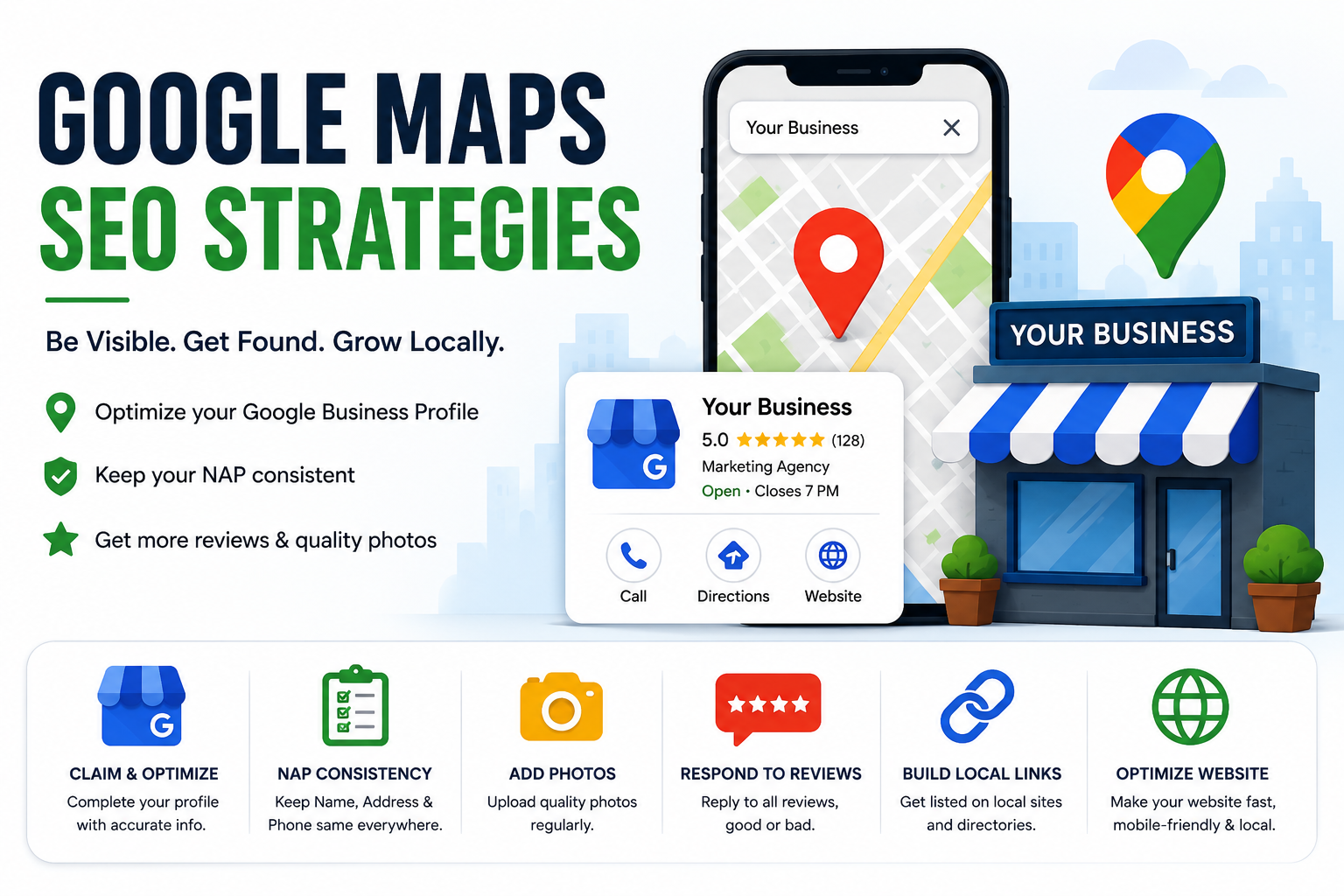
Claim and Optimize Your Google Business Profile
The first step is to exist on Google Maps. If you haven’t claimed your Google Business Profile (GBP) yet, nothing else on this list matters. Straight up, go to google.com/business, verify your listing, and fill out every single field, including category, description, services, attributes, opening hours, and website link.
As per the patterns of users examined previously, it is seen that businesses with a fully completed profile see more direction requests, calls, and website clicks than those with half-filled listings.
Pro Tip: Avoid using phrases like “We are the best and most trusted service provider” in your business description. The fact that nobody believes that, and neither does Google’s algorithm. Instead, try adding something factual and specific so a customer can trust. For example, you can use a phrase like “We have helped over 3,000 families in Andheri since 2015, specialising in same-day AC repair”.
Ensure NAP Consistency Across the Web
NAP is no rocket science; it simply stands for “Name, Address, Phone number”. If your business is listed as “CTV Advertisers” on Google, “CTV Advertising Solutions Pvt. Ltd.” on Justdial, and “CTV Advertising Agency” on Facebook, Google gets confused. And a confused algorithm doesn't rank you because it only ranks the businesses it can trust.
Let us give you an example of what works and what does not:
| Platform | Name Listed | Consistent? |
|---|---|---|
| Google Business Profile | CTV Advertisers | Yes |
| Justdial | CTV Advertising Solutions Pvt. Ltd. | No |
| Facebook Page | CTV Advertising Agency | No |
| Website Footer | CTV Advertisers | Yes |
If you audit like this, you are effortlessly doing the most underrated fixes for why is my business not ranking on Google Maps.
Add Lots of High-Quality Photos
Imagine you are searching for a job and come across a company with a relevant package and perks. Now, you will straight up head to Google to check out their office, the team, their website, and try to get an idea of the work culture with the images available.
On the flip side, if a business has listed itself with more photos consistently, they tend to get more requests for directions and more website clicks than listings with few or no images. Even though Google has itself confirmed this pattern repeatedly in its own guidance to business owners.
Given that, you can add the following:
- Exterior shots so people can recognize your store/office front from the street. Also, update fresh photos monthly.
- Interior shots enable them to know that they on a right location.
- Team photos because people trust faces, not just facades.
- Any products or services in action.
Respond to Reviews
Reviews influence both trust and Google Maps ranking. Besides, reviews are not just social proof for customers. Think of them as raw material used by AI summaries to pull from when someone searches for businesses like yours.
When Google shows an AI overview of your reviews, that summary becomes many customers' first impression of you, before they even click your listing.
Moreover, you need to make sure that you respond to every review, good or bad. Here is an example of how you can respond to both positive and negative comments:
Positive Comment:
User: “Excellent service and quick delivery”.
Poor Reply: “Thanks”.
Better Reply: “Thank you, Rahul! We're glad our same-day delivery helped your business”.
Negative Comment:
User: “The parking space was very limited, and it was difficult for me to find a parking spot during peak hours”.
Better Reply: “Thanks for the feedback, we've already fixed the parking issue you mentioned”.
Build a Strategic Local Link Profile
Getting mentioned and linked to by local news sites, community blogs, and neighborhood associations informs Google that your business is genuinely rooted in that area, besides being a listing with a pin on a map.
For example, a sponsorship of a local college fest, a feature in a city-based blog, or a mention on your local trade association's website all count.
Optimize Your Website for Local Search
Mark our words: “Google doesn't rank Maps listings independently”. It evaluates your site, including location pages, service pages, local schema, contact page, mobile optimization, and fast loading speed.
This way, your map ranking and your website's SEO are tied together. If you want to establish a strong Google Maps SEO, then you have to add your city and neighborhood naturally into page titles, headers, and service pages.
For example, a digital marketing business in Pune should have a page titled “Digital marketing solutions in Kothrud, Pune” instead of having a generic “Our Services” page.
Now this allows marketers to have structured data (schema markup) for local businesses. As a result, this will help Google and AI search tools understand exactly who you are, where you are, and what you do.
Promote Your Events
The most traditional solution to the question “how to get more customers from Google Maps” could be to promote events. Google Business Profiles allow businesses to publish events in the form of free workshops, product launches, holiday offers, local seminars, or store/office anniversaries.
Doing this will benefit businesses in two ways: First, it gives searchers a reason to visit now, and second, it signals to Google that your business is active and locally engaged.
Optimize for Google Maps Proximity Factors
Here comes the part that many organizations or store owners skip. Location and proximity are factors you genuinely can't fully control. Let’s say you cannot move your office closer to every customer.
But there is a solution to compete within your realistic radius. If you serve multiple neighborhoods, you might want to add a second, real location or service area listing. In this situation, create localized service pages, such as “SEO Services in Noida”, “SEO Services in Gurgaon”, or “SEO Services in Delhi”.
This supports local SEO for Google Maps without keyword stuffing and ensures your pinned address on the map is pixel-accurate.
Post Regularly to Your Google Maps Business Listing
Think of Google Business Profile like social media. Google posts like updates, offers, products, tips, news, case studies, events, or FAQs are something that keeps your brand alive across a wide spectrum. They directly appear on your Maps listings and keep your profile active.
Initially, keep a target of at least one post a week.
Build Citations on Relevant Directories
A citation is a reference to a source that gives credit to the original authors. In simple words, citations are mentions of your business (NAP details) on other websites, like Justdial, Sulekha, IndiaMART, industry-specific directories, and local business associations.
But instead of focusing on quantity, make sure to focus on quality. This means ten relevant, accurate citations on directories your actual customers use will outperform fifty random, low-quality listings that are of no use.
Track and Adapt Your Google Maps Strategy
You can’t fix what you don’t measure. Google Maps ranking is no exception. So, start using Google Business Profile Insights to track:
- How people found you, i.e., either by direct search or discovery search.
- What actions they took, such as calls, direction requests, or website visits.
- Which photos and posts got the most views?
Track these insights on a regular basis, as these insights tell you something specific about how customers are engaging.
Bonus: Businesses can also use Google Search Console, Google Analytics, and call tracking software for the same.
Add Local Keywords to Your Website
Beyond your homepage, build out individual pages or sections targeting how real people actually search. Try to naturally include the city, neighborhood, or services.
Example: “We provide interior design services across South Delhi, including Saket, Malviya Nagar, and Greater Kailash”. Also, try to accommodate pages like “affordable gym near Koramangala”, “24-hour pharmacy in Sector 62”, and so on.
The only thing you have to avoid here is keyword-stuffing. Your aim should be to write for a real person first, and the search engines will follow.
Embed a Google Map on Your Website
A simple embedded map on your Contact, Footer, or Location page reinforces your address to Google and makes it easier for customers trying to find you. It's a five-minute technical fix with a real ranking benefit.
Keep Your Hours Up-to-Date
Imagine a customer searching for your business on Google Maps after work. They drive 20 minutes to your location because your Google Business Profile says you're open until 8 PM. But when they arrive, the shutters are down.
This causes two things: first leave the person disappointed, and leaves a negative impression in their mind, leading them to choose your competitor next time.
Update your hours for holidays, festivals, and special closures the moment they change. This single habit directly affects how to get more customers from Google Maps, because inaccurate hours keep you away from foot traffic.
How Can Adomantra Help You Rank on Google Maps?
If all of this feels like a lot to manage on top of actually running your business, that's fair to think, because it is. Adomantra's local SEO and Google Maps optimization team handles the technical groundwork, including profile optimization, citation building, review management workflows, local link building, and ongoing performance tracking.
Rather than chasing shortcuts, our focus is on building long-term visibility that helps your business attract genuine local customers and gradually improve Google Maps ranking.
In essence, instead of guessing what's holding your ranking back, you get a team that diagnoses it, fixes it, and reports back in numbers you can actually use to make decisions.
A Quick Summary
As we are about to conclude this guide, it’s safe to say that improving Google Maps ranking is not about quick fixes. It is just a simple effort of consistently building trust with both Google and the customers.
A few technical fixes, like creating a Google Maps profile, updating proper business information, managing reviews with prompt responses, and following the above-mentioned Google Maps SEO practices, can create a sustainable local presence.
Irrespective of the fact that your goal is to attract more walk-in customers, generate qualified leads, or expand your local market, investing in Google Maps optimization today can deliver long-term results.
Are you ready to stop losing customers to the competitor down the street? Get your Google Maps audited by Adomantra and join us to witness the strategy made for your business and location.
FAQs
Q1: How do I rank my business on Google Maps?
A: List your business and fully complete your Google Business Profile. Moreover, keep the NAP details consistent everywhere online, respond to reviews, add regular posts, build local citations, and links. Remember, Ranking is a combination of relevance, distance, and prominence.
Q2: Why is my business not showing on Google Maps?
A: It happens because an unclaimed or unverified profile, inconsistent NAP details across the web, a suspended listing due to guideline violations, wrong business categories, and very few reviews compared to nearby competitors.
Q3: How long does it take to rank on Google Maps?
A: Most of the time, you can start seeing improvements within 4 to 12 weeks of consistent working. However, highly competitive categories in heavily populated cities can take longer to show positive results.
Q4: Can I outrank competitors with more reviews?
A: Yes, you can actually do that. With stronger optimization, better engagement with reviews, and correct categories, businesses can outrank their competitors.
Q5: How do Google Maps rankings work?
A: When someone searches for something like “digital marketing solutions provider”, Google’s algorithm scans nearby business profiles and scores them based on relevance, distance and prominence. It then ranks the top matches in the Local Pack and Maps results. This means profiles with quality, complete information and strong engagement signals rise to the top.